


Chord ai - learn any song
4.71.21K Reviews
App Specs
- Version
- 2.8.06
- Updated On
- License
- Free
- Downloads
- 1,000,000+
- Developer
- Machinita Technologies
- Categories
- Music & Audio
- Platform
- Android
Screenshots
 Analysis by AppCompare
I usually reach for an app like this when I have a song in my head but not the patience to hunt through chord charts one by one. With Chord ai, the useful starting point is the sound itself: I can play music for it or use the microphone while a song is playing, then work from the chords it identifies. That makes it less like a song library and more like a listening tool for musicians who want to get from “what is happening here?” to a playable starting point.
That distinction matters. If I already know the song and only need a neatly typeset chord sheet, a conventional chart site may be quicker. If I want to explore an unfamiliar recording, check a progression by ear, or adapt a song for my instrument, this app has a more interesting role. It is free to install, aimed at everyone, and made by Machinita Technologies. Its 4.8 average from around 52,000 ratings and more than a million installs suggest it has found a substantial audience, though I still treat any automatic transcription as a first draft rather than musical truth.
Start with a song, not a search
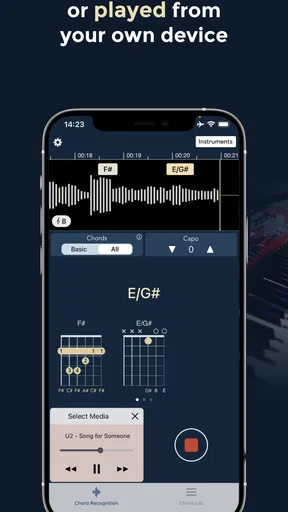
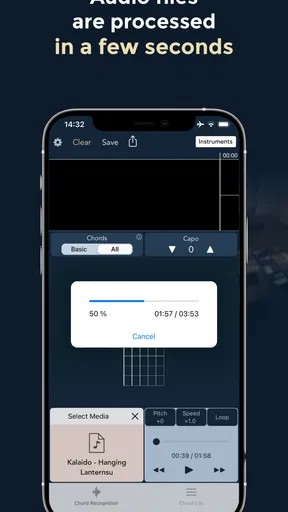
My most natural workflow begins with a track I can already play on a device, or with a song audible nearby. I open the app and give it audio to analyze; the microphone route is handy when I’m playing along or listening from another source. The appeal is that I don’t need to know the title, artist, or progression before I begin. I can start with the sound and see what the app makes of it.
For a realistic practice session, imagine I’m trying to learn a chorus before meeting friends to play. I can listen to the section, note the displayed chords, then pick up my guitar and test the shapes against the recording. If something sounds off, I can replay the passage and compare the app’s suggestions with what my ear expects. That back-and-forth is more useful than copying a chart without hearing how its changes line up with the song.
A Musician's Best Friend
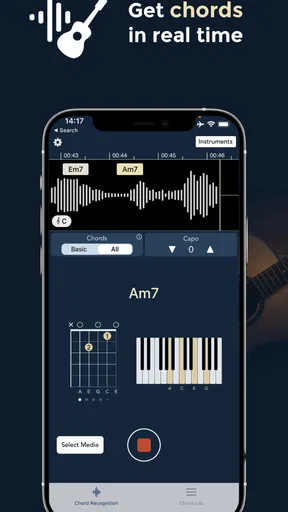
First things first, let me tell you how easy it is to get started with Chord ai. You just open the app, play your song, and voilà! The app listens and analyzes the audio to display the chords in real time. It's like having a music teacher in your pocket. The interface is super user-friendly, so even if you’re not tech-savvy, you’ll get the hang of it in no time.
How Does It Work?
The magic behind Chord ai is its use of artificial intelligence to recognize chord patterns. You can either play a song directly from your device or let the app listen through the microphone if you're jamming along. It covers a wide range of instruments, so whether you’re on a guitar, piano, or ukulele, you’re good to go.
What I love about this app is its accuracy. It’s not perfect, but it gets the job done most of the time. Plus, it gives you multiple chord options if it detects variations, which is super handy when you’re dealing with complex compositions.
Worth Reading Before You Choose

Flipboard Shows What News Apps Must Do Beyond the Feed

Switching to Android Auto Means Rethinking Your Driving Routine

Google Calendar Makes a Crowded Week Easier to Manage

Ludo King Makes the Most of the Minutes Between Plans

Baby Panda World Brings Quick Play to Modern Phones, but Its Game Library Feels Busy

ESPN’s Live Game View Makes Following Close Games Easier
Turning the first result into a playable part
Once I have a progression on screen, I don’t treat it as a finished arrangement. I use the chord names as clues, then check them against the bass movement and the quality of the song’s harmony. If the app offers more than one possible chord, that is a useful reminder to listen again rather than a reason to guess. A chord label can be technically plausible while still missing the voicing or context that makes the recording feel right.
This is where the app can help beginners without replacing their ears. A new player can try a suggested shape and hear whether it fits; someone more experienced can use the result to narrow down a section they would otherwise have to work out note by note. For a piano player, the same chord names are a starting point for building voicings, not a command to copy a guitar-style chart. The benefit is quicker orientation, while the musical decision remains yours.
Features That Stand Out
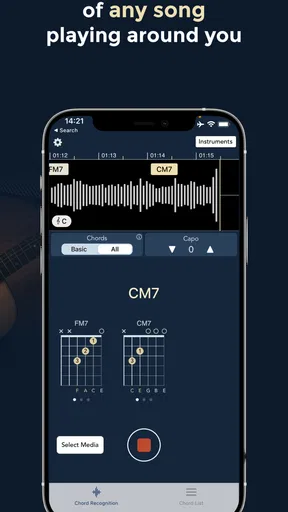
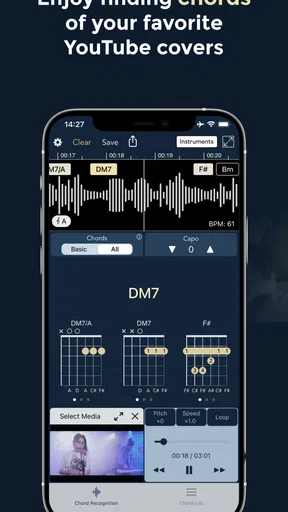
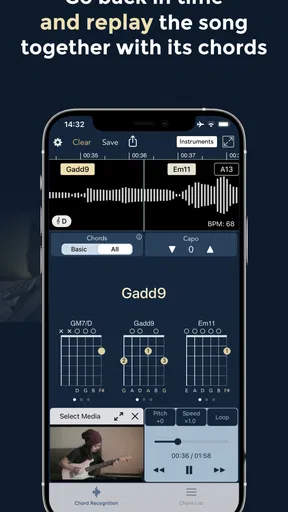
Now, let's talk about the features. One of my favorites is the ability to slow down the song without changing the pitch. This is a game-changer for those tricky solos or fast-paced songs. The app also provides chord diagrams, so if you’re unsure about a chord, you can see exactly how to play it.
Slowing a passage is most valuable when I use it selectively. I first listen at normal speed to understand the feel, then slow the part that contains a quick change and practice moving between the relevant shapes. Keeping the pitch unchanged means I can still compare the slowed audio with the chord I’m trying. I wouldn’t slow an entire song by default: that can make it harder to feel the groove, so I use it as a close-up tool and return to full speed before deciding whether I have learned the transition.
The diagrams also solve a practical problem that chord names alone do not. A player may recognize a chord symbol but not know a comfortable fingering, especially when switching from one instrument to another. I use the diagram as a quick visual reference, then choose a shape that works with my own tuning and level. It helps most when I’m at the instrument already; it is less useful if I’m looking for a complete lesson on technique or a guided course in harmony.
Making the chords fit your voice and setup
Another cool feature is the capo function. You can use this to transpose the chords to match your vocal range or instrument tuning. It's like having a personal music assistant tailoring everything to your needs.
In practice, I’d use that adjustment after identifying the original progression, not before. First I check whether the chords make sense against the recording; then I shift them to a key or set of shapes that is more comfortable to sing and play. That order keeps the source and my arrangement distinct. It is especially handy when a singer can manage the melody more comfortably at a different pitch, but it does not decide the best key for them—you still need to sing through the chorus and judge the result.
There is also a useful handoff here between discovery and rehearsal. I can use the app to get a rough map, write down the progression I want to test, and then practice without staring at the screen for every change. For a casual jam, that helps me arrive with a workable version instead of spending the first half of the session searching. For a careful cover, I would still verify repeated sections and transitions by ear, because an automatic chord sequence may not capture every detail of an arrangement.
Where automatic listening can mislead
While Chord ai is fantastic, it’s not without its quirks. Sometimes, the app struggles with live recordings or songs with heavy distortion. It’s also worth noting that the app requires a decent internet connection for the best performance, which might be a bummer if you’re in a low-service area.
Audio quality and arrangement make a real difference to this kind of listening workflow. A clean recording gives the app a clearer target than a noisy room, a crowded mix, or a live performance with audience sound. If I’m checking a difficult passage, I try to listen to a clearer version and isolate a short section rather than expecting one pass over a full, dense track to settle every chord. That is a practical way to improve the odds, not a guarantee that the result will be correct.
There is a trade-off in using a microphone, too: the app hears the sound that reaches the phone, not the intention behind my playing. If I am practicing loudly in a room with other instruments or background noise, the input may be harder to interpret. I get better value by listening in a quieter spot and checking the displayed progression against the recording. When a clean answer matters more than speed, learning the part by ear or consulting a carefully prepared chart can be the better choice.
It is also worth deciding what kind of learner you are. If you want to understand why a progression works, this tool can give you material to study, but chord recognition alone will not explain the theory. If you only want a ready-made songbook, a dedicated chart collection may suit you better. I see the strongest fit for players who are comfortable testing suggestions and adapting them, rather than anyone expecting an automatic arrangement to be performance-ready without review.
Room for Improvement
Additionally, while the app is free, it does have some in-app purchases for advanced features. However, even without spending a dime, the app provides plenty of value.
The app is free, with in-app purchases priced from $2.49 to $254.99 per item, so I would check what a particular paid option includes before committing. The current version is 2.7.73, and it runs on Android 8.0 or later. I’d start with the free experience and make a purchase only if I had a specific need the free version did not meet. That keeps the decision grounded in my own workflow rather than a vague promise of “more.”
For someone choosing between this and a tuner, a metronome, or a chord-chart app, the difference is purpose. Those tools help with tuning, timing, or looking up known material; this one is for turning audio into chord clues. It is not a replacement for all three, and it does not need to be. I would keep using a tuner to get the instrument in tune and a metronome for steady practice, then bring this app in when I need help mapping a song I have not already learned.
Who will get the most from it
I’d recommend it most to guitar, piano, and ukulele players who often learn songs by listening, especially beginners who need a practical bridge between hearing a chord and finding a shape for it. It can also help an experienced player check a hunch or get unstuck on a passage. The best results come when you treat the screen as a guide, replay uncertain moments, and make the final call with your ears.
I’d skip it if I needed a guaranteed transcription of a noisy live recording, a full lesson plan, or a polished arrangement ready for a paid performance. It is also not the right shortcut for someone who wants to avoid listening carefully: the app can speed up discovery, but it cannot replace practice, judgment, or the small adjustments that make a cover sound convincing. Those limits are not deal-breakers; they define the job it does well.
Final Thoughts
Overall, Chord ai is a must-have for musicians. It’s like having a cheat sheet for every song you love. Whether you’re practicing alone or preparing for a gig, this app can save you time and effort. It’s perfect for anyone who wants to improve their playing or just wants to have fun with music.
With an Everyone content rating and a 4.8 average, it is easy to see why it appeals to players looking for a quick way into a song. I’d describe it less as an answer machine and more as a useful first pass: hear a track, inspect the chord possibilities, slow down a tricky bit, and then verify everything on your instrument. That modest expectation is what makes the app genuinely helpful.
If you’re ready to take your music skills to the next level, I’d definitely recommend giving Chord ai a try. It might just become your new favorite app.
Pros
- Accurate chord detection for most songs.
- Supports a wide range of instruments.
- User-friendly interface for beginners.
- Works offline for convenience.
- Regular updates with new features.
Cons
- Limited free features; premium needed.
- Occasional errors with complex songs.
- No integration with streaming services.
- Might be challenging for complete novices.
- Requires manual corrections sometimes.
FAQs for Chord ai - learn any song
What is Chord ai and how does it work?
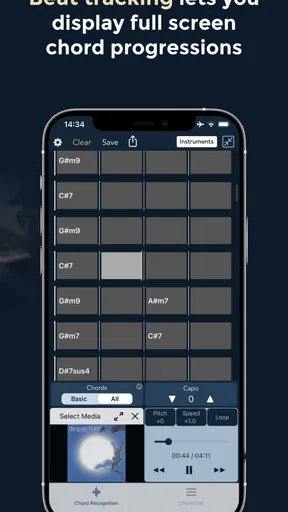
Chord ai is a powerful mobile application designed to help musicians and enthusiasts learn and play any song by detecting chords and beats in real-time. By using advanced AI technology, it analyzes audio input, whether from a recording or live performance, and provides users with accurate chord structures and rhythmic patterns, enhancing their practice sessions.
Is Chord ai suitable for beginners or only for advanced musicians?
Chord ai is suitable for both beginners and advanced musicians. Beginners will find it helpful for understanding chord structures and improving their playing skills, while advanced musicians can use it to quickly pick up complex songs and explore new musical ideas. The app's intuitive interface makes it accessible to users of all skill levels.
Can Chord ai detect chords from live performances or only from recorded songs?
Yes, Chord ai can detect chords from both live performances and recorded songs. Using sophisticated AI algorithms, it listens to the audio in real-time and provides accurate chord progressions and beat information, making it a versatile tool for live musicians as well as those practicing with recorded tracks.
Does Chord ai support all musical genres and instruments?
Chord ai supports a wide range of musical genres and instruments. It can analyze songs from pop, rock, jazz, classical, and more, making it a versatile tool for any musician. While it primarily focuses on guitar and piano chords, its comprehensive detection capabilities make it useful for other instruments as well.
Is Chord ai available for both Android and iOS devices?
Yes, Chord ai is available for download on both Android and iOS devices. This cross-platform availability ensures that musicians can access its features regardless of their device preference. Users can find the app on the Google Play Store for Android and the App Store for iOS, making it widely accessible.


